WholeClear Introduces Investigator for Email Forensics and Digital Evidence Examination
New Windows desktop application brings email inspection, indexed search, communication analysis, and evidence documentation into one workspace
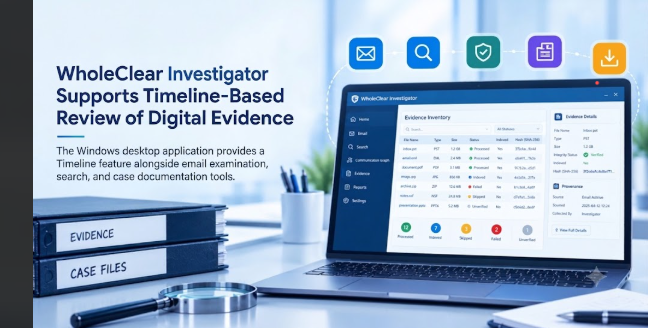
New Delhi, Delhi, India, October 23, 2026 pressrelease.in - WholeClear has introduced WholeClear Investigator, a Windows desktop application developed for digital forensic investigators, eDiscovery reviewers, corporate investigation teams, incident response professionals, and compliance teams that need to examine email records and related digital evidence.
The application provides a structured workspace for reviewing supported email files, searching indexed content, examining message headers and routing details, analyzing communication relationships, and preparing evidence packages with supporting integrity records. It brings several stages of email evidence examination together within a single investigation environment.
Listed as version 1.0, WholeClear Investigator is designed for 64-bit Windows systems. The software has separate Full and Demo editions, and an evaluation installer can be requested through the product website. Its processing capabilities vary according to file format, available integrations, and the active edition.
Features of WholeClear Investigator
Supporting Evidence Inventory and File Format
· Case-wide evidence inventory: Add supported email files, mailboxes, folders, documents, images and archives to a central case inventory.
· Processing status: Review file types, file size, supported/unsupported, integrity status and indexing progress. Identify items that have failed, been skipped, remain unverified, or are not indexed.
· Support for email formats: View PST, OST, EML, EMLX, MSG, MBOX, MBX, and NSF files with certain format-specific conditions.
· Document and image support: Process PDF, DOCX, XLSX and PPTX documents as well as supported image formats, including JPG, PNG, GIF, WEBP, BMP and TIFF. If activated, OCR is available.
· Processing folders and archives: Process folders of EML, EMLX and MSG files, extract TGZ and TAR.GZ archives and examine ZIP and NUPKG nested containers where supported.
Some formats need additional components. For example, NSF processing requires a compatible HCL Notes or IBM Notes installation and the necessary integration.
Email Indexing and Searching
· Detailed message inspection: Inspect message content, attachments, properties, headers, routing hops, transit IPs, MIME structure, HTML, RTF, URLs, hashes and raw message data when available.
· Advanced search options: Search indexed evidence with keywords, exact phrases, boolean operators, wildcards, proximity queries, field-specific searches, fuzzy matching and regular expressions.
· Date-based filtering: Filter results based on date-from and date-to.
· Ranked results and snippets: View relevant matches and contextual snippets from indexed content and extracted text.
Search results rely on successful processing and indexing. Processing status is useful to interpret results, because unsupported, failed, skipped or partially processed evidence may not be fully searchable.
Activity Audit & Communication Analysis
· Graph of communication: View the connections between e-mail addresses found in the indexed messages, and select connections to view the available information.
· Sender and recipient analysis: Find common email addresses based on message counts.
· Address search: Search for specific email addresses and examine associated communication records.
· Graph exports: Export communication graphs and activity summaries in supported PNG or PDF formats for documentation and review.
These features allow investigators to explore communication patterns in an evidence collection. The relationships thus established are indicative of available message data and do not in themselves establish identity, intent or wrongdoing.
Evidence Integrity and Investigation Tracking
· SHA-256 hashing: Log and verify the integrity of the evidence files you can support.
· Integrity View: Review available integrity information.
· Chain of custody logs: The application’s chain of custody view lets you log and document evidence.
· Audit log: Review the recorded activities related to the investigation.
· Exceptions processing: Identify items with errors or other processing limitations.
· Timeline: Use the Timeline feature in the application sidebar to help you with chronological investigation workflows.
The records are helpful for documenting the handling and processing of evidence. Hashes and audit information help with traceability but do not guaranty authenticity or legal admissibility on their own.
Forensic Reporting & Export
· Selective evidence export: Export all or selectively export individual evidence and search results for a more targeted review.
· Evidence packages: Should include copies of supported evidence, attachments, metadata and extracted documents.
· Extracted text: If possible, separate the original text from the OCR and other extracted text.
· Integrity and provenance records: Provide SHA-256 hash records and a provenance manifest where supported.
· Dossier reports: Prepare investigation documentation using the reporting functions available in the application.
· Multiple output formats: Information supported by the selected export function and active license can be exported in CSV, Excel, JSON, HTML and PDF formats.
Export workflow is designed to organize evidence and supporting documentation for further review. It does not replace the original source files and does not replace the need for appropriate procedures for the handling of evidence.
Desktop Requirements and Availability
WholeClear Investigator is listed as version 1.0 for 64-bit Windows. Its bundled engine does not require a separate .NET Runtime installation. Actual memory and storage requirements depend on the size of the evidence collection, indexing scope, OCR workload, and processing activity.
The software is available in separate Full and Demo editions. An evaluation installer can be requested through the official product page, where users can also check the available product information and format-specific requirements.
For further details, visit https://www.wholeclear.com/investigator/.
About WholeClear
WholeClear develops software for email migration, conversion, cloud backup, contact management, and email data handling. Its products address different requirements associated with managing, transferring, and accessing email and related data. WholeClear Investigator extends the company's software portfolio into email forensics, digital evidence examination, indexed investigation, and forensic-oriented reporting.
Media Contact
WholeClear Software
Website: https://www.wholeclear.com/
Email: support@wholeclear.com
WholeClear Software
WholeClear